Best AI Baby Dance Prompt? Use Motion Control Instead (2026)
If you are endlessly searching Google, TikTok, or Reddit for the "perfect AI baby dance prompt," you are likely frustrated. You type a highly detailed prompt into Kling or Viggle, hit generate, and the result is a melting face, six fingers, or a dance move that looks more like a glitch than choreography.
You might think you are just bad at writing prompts. You aren't. The problem is the technology you are using.
In 2026, relying purely on text prompts to generate complex human dance motions is outdated. It is a fundamental mismatch between the tool (Text-to-Video) and the goal (Precise Choreography).
This comprehensive guide will break down the technical reasons why your prompts are failing, introduce you to the industry standard of Motion Control Templates, and provide a step-by-step workflow to generate flawless, viral-ready AI baby dance videos without ever typing a single prompt.
1. The Anatomy of a Failed Prompt: Why Text-to-Video Struggles with Dance
To understand why your prompts aren't working, we need to look under the hood of AI video generation models like Kling, Veo, and Sora.
The Heavy Burden of Text
When you submit a text prompt—for example, "A photorealistic toddler in a blue hoodie doing a hip-hop bounce with side-to-side arm swings, detailed face, cinematic lighting, 4k"—the AI model is forced to solve extremely complex equations simultaneously. It has to:
- Maintain Identity: Remember what the toddler's face looks like from frame 1 to frame 120.
- Understand Physics: Calculate how gravity affects clothing when jumping.
- Map Choreography: Translate the vague words "hip-hop bounce" into precise XYZ coordinate movements for dozens of joints (shoulders, elbows, knees).
The Three Common Failure Modes of Prompting
Because the AI is guessing the physics based on text descriptions, it frequently breaks under the pressure of fast movement. This results in the "Big Three" AI video artifacts:
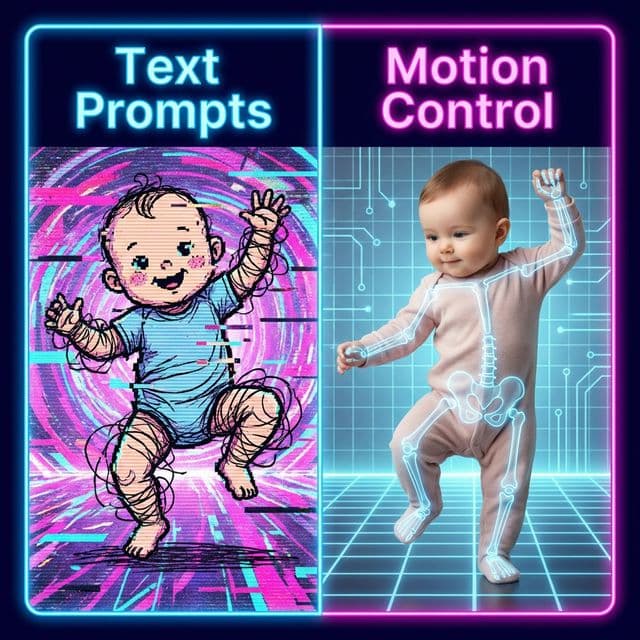
- Identity Drift: This is the most common issue in AI baby dance videos. The video starts looking like your child, but as soon as they turn their head or sweep their arm across their face, the neural network "forgets" the original facial features. The toddler suddenly morphs into a different person halfway through the clip.
- Temporal Inconsistency (Flickering): Without a physical skeleton to bind the pixels together, the AI generates each frame slightly differently. This manifests as clothing that constantly changes texture or backgrounds that warp and boil.
- Pose Collapse: Human anatomy is difficult for AI to maintain during complex overlaps (like crossing arms). Text prompts cannot force the AI to respect joint limits, leading to horrifying results like backward-bending knees or arms melting into torsos.
(Pro Tip: If you are specifically struggling with low-resolution output rather than motion, read our dedicated guide on fixing blurry AI baby dance videos.)
2. The Paradigm Shift: Motion Control and the Template Matrix
If text prompts are the problem, what is the solution? The answer is Motion Control (often powered by technologies similar to AnimateAnyone or Kling 2.6's advanced pose guidance).
Instead of forcing the AI to imagine the dance from a text description, Motion Control separates the video generation into two distinct layers:
- The Appearance Layer: Provided by your uploaded photo.
- The Motion Layer: Provided by a driving signal, usually a pre-processed skeleton or reference video.
How Motion Control Solves the "Prompt Problem"
With Motion Control, the AI no longer has to guess what a "hip-hop bounce" looks like. The exact spatial coordinates, timing, and rhythm are explicitly provided by the reference motion. The AI’s only job is to precisely map your uploaded photo's textures onto that moving skeleton.
This radically changes the user experience: You do not need to write prompts anymore.
Instead of typing, you simply select a highly optimized preset—a Motion Template. This guarantees that the dance will be physically accurate, rhythmically on-beat, and anatomically stable.
3. Real-World Case Study: Prompting vs. Templates
To illustrate the stark difference in quality, we ran a side-by-side test. We attempted to generate a "Motorcycle Dance" sequence using two different methodologies.
Case A: Traditional Text-to-Video
The Prompt: "Toddler doing a motorcycle dance..."
The Result: Hands merged, identity drifted, and rhythm was erratic. Required 15 retries.
Case B: AI Baby Dancer Motion Template
The Prompt: None. Selected "Motorcycle Dance" template.
The Result: Flawless execution. Hands separated, rhythm locked. Generated on the first attempt.
The takeaway is clear: If your goal is to recreate a viral TikTok or Reels dance trend, Motion Templates are exponentially more reliable than text prompts.
4. The Top 5 Viral Dance Templates (No Prompts Required)
Stop wasting your GPU credits on prompt engineering. Based on our analysis of high-performing baby-dance trends, these five templates repeatedly outperform text-only attempts:
1) Baby Boo Dance
The "she gon call me baby boo" challenge is a strong match for close-up, expression-led edits.
Why it beats prompts: tiny wrist accents and bounce timing stay consistent instead of drifting frame to frame.
2) Drunk Dance
Best for comedic clips with loose upper-body sway and unstable rhythm.
Why it beats prompts: "stumbling" motion from text often breaks leg tracking; template motion keeps body physics stable.
3) Motorcycle Dance
Great for high-energy edits with visible hand-control gestures.
Why it beats prompts: complex "invisible handlebars" hand positions are difficult to describe in text and easy to execute with a template.
4) Midu Echoing (弥渡山歌)
A loop-friendly style with delayed arm echoes and smooth torso rhythm.
Why it beats prompts: repeated echo-gesture timing is hard for text-to-video models to lock without structural artifacts.
5) Subject 3 (科目三) Dance
One of the most viral choreography formats for side-leg sway + hand-sync combos.
Why it beats prompts: hand-overlap and ankle-sway coordination usually collapse in text generation, but stays clean with motion control.
If you want more options, explore Ghost Step Dance and Expression Challenge in the full Template Directory.
5. How to Create a Viral AI Baby Dance Clip in 3 Steps
Ready to ditch the prompt box? Here is the exact, fail-proof workflow used by top creators on our platform.
Step 1: Prepare the Perfect Source Photo
The quality of your output is completely dependent on your input photo.- Do: Use a well-lit, front-facing photo. Ensure the child's hands and feet (if generating a full-body dance) are clearly visible and not cut off by the edge of the frame.
- Don't: Use photos with heavy shadows across the face, extreme side profiles, or complex, blurry backgrounds.
Step 2: Select Your Motion Template (Or Upload a Reference)
Navigate to the [AI Baby Dance Generator](/) or use our [Web App](/ai-baby-dance-app). Browse the Template library and select the dance that fits your vision.Want to recreate a specific celebrity dance, like Babymonster or a scene from Stranger Things? You aren't limited to our presets. You can download a short clip of that exact dance from YouTube, and upload it as a Reference Video. The AI will extract the skeleton from the video and map your photo onto it.
Step 3: Generate and Publish
Click generate. Because you are using Motion Control, the rendering success rate is drastically higher. Within minutes, you will have a stable, rhythmic, socially ready 9:16 vertical video. Download it and upload it directly to TikTok, Instagram Reels, or YouTube Shorts.6. How to keep template testing affordable
Prompt-driven retries get expensive because you are paying to discover what motion the model cannot hold together. Motion templates cut that waste by giving you a stable first pass, so you can spend credits on the clip that is actually worth polishing.
If you want to compare starter access, monthly plans, or one-off packs before you test more templates, see: AI Baby Dancer pricing and credits.
Conclusion
The era of typing "cute baby dancing smoothly, 4k, no artifacts" and crossing your fingers is over. The "best AI dance prompt" doesn't exist, because text was never meant to choreograph complex physical motion.
By shifting your workflow to Motion Control Templates, you eliminate identity drift, stop the structural melting, and achieve professional-grade consistency on your first try.
Stop searching for prompts. Start creating with motion.
Try the Free AI Baby Dance Generator Now (No Prompts Needed) →